Provider Questionnaire Authoring
- There are two questionnaire roles:
initialfor a patient's first (or changed-symptom) consultation andfollowUpfor returning patients. - You upload both the same way:
PUTa draft through the partner API, walk through it in the provider portal's simulator, then publish it. Cannaflow's sharedanamnesisandanamnesis-followupquestionnaires stay available to every provider unless you disable them. - Follow-up validation is on by default. A follow-up submission is only
accepted when the patient already has a completed consultation — a signed
prescription — with your organization. Otherwise the consultation is
rejected with
422 QuestionnaireNotApplicable. Initial questionnaires are never gated. - Cannaflow configures this check per provider. If your own systems already guarantee that a follow-up only reaches Cannaflow for known patients, contact Cannaflow and we can switch the check off for your organization.
This guide describes how a telemedicine provider supplies its own patient questionnaires for Cannaflow onboarding. A provider that uses a shorter return visit flow should supply two definitions:
| Role | When it is used | Required content |
|---|---|---|
| Initial questionnaire | A patient's first consultation, or when the patient's symptoms have changed | Complete medical history, indication, contraindications, and treatment eligibility |
| Follow-up questionnaire | A returning patient with a completed consultation whose symptoms are unchanged | Changes since the previous consultation, treatment response, side effects, and contraindications |
The follow-up questionnaire must not be used as the patient's first intake. The patient's questionnaire role is selected from their consultation history; it is not selected from an untrusted client request.
Provider Catalogue
Each provider has its own questionnaire catalogue and may create any number of
initial and followUp questionnaires. Provider slugs are private to the
organization, while Cannaflow's shared anamnesis and anamnesis-followup
definitions remain enabled by default. A provider may disable a shared
definition for its organization.
Definitions are uploaded as drafts, previewed in the provider portal's stateless simulator, and explicitly published (see How It Works End to End). The server assigns increasing integer versions. Published versions are immutable; replacing the draft after publication creates the next version. Archiving prevents new submissions but retains every published version for historical rendering.
How It Works End to End
The lifecycle is the same for an initial and a followUp questionnaire:
upload a draft, try it out, publish, and the doctor sees the answers on every
consultation that used it.
1. Upload a draft
Send the definition to PUT /telehealth/questionnaires/{id}/draft. The path
{id} is the slug you choose; it becomes the questionnaire's stable identity
across versions. The example below uploads a short follow-up questionnaire (the
full definition format is described under Definition Schema).
curl -X PUT https://api.doctors.cannaflow.de/api/v1/telehealth/questionnaires/telemed-followup/draft \
  -H "x-api-key: $CANNAFLOW_API_KEY" \
  -H "Content-Type: application/json" \
  -d @telemed-followup.json
The server validates the graph before storing anything. A valid definition is stored as a draft; the response tells you so:
{
  "id": "telemed-followup",
  "slug": "telemed-followup",
  "version": 1,
  "role": "followUp",
  "status": "draft",
  "source": "provider",
  "revision": 1,
  "title": { "de": "Verlaufskontrolle", "en": "Follow-up check" },
  "firstQuestionId": "symptoms-changed",
  "questions": ["…"]
}
An invalid definition is rejected with 400 InvalidArguments and nothing is
stored. Every problem is listed in payload.issues with a JSON path, so you can
fix them all in one pass:
{
  "id": "InvalidArguments",
  "message": "Questionnaire definition is invalid",
  "payload": {
    "issues": [
      {
        "code": "unknown_branch_target",
        "path": "questions[0]",
        "message": "Branch target \"does-not-exist\" does not exist."
      }
    ]
  }
}
2. Try it out in the provider portal
Open Questionnaires in the provider portal. The simulator lists every questionnaire your organization can use — your own drafts and published versions as well as the shared Cannaflow defaults — and walks through it exactly as a patient would. Nothing entered here is stored or submitted.
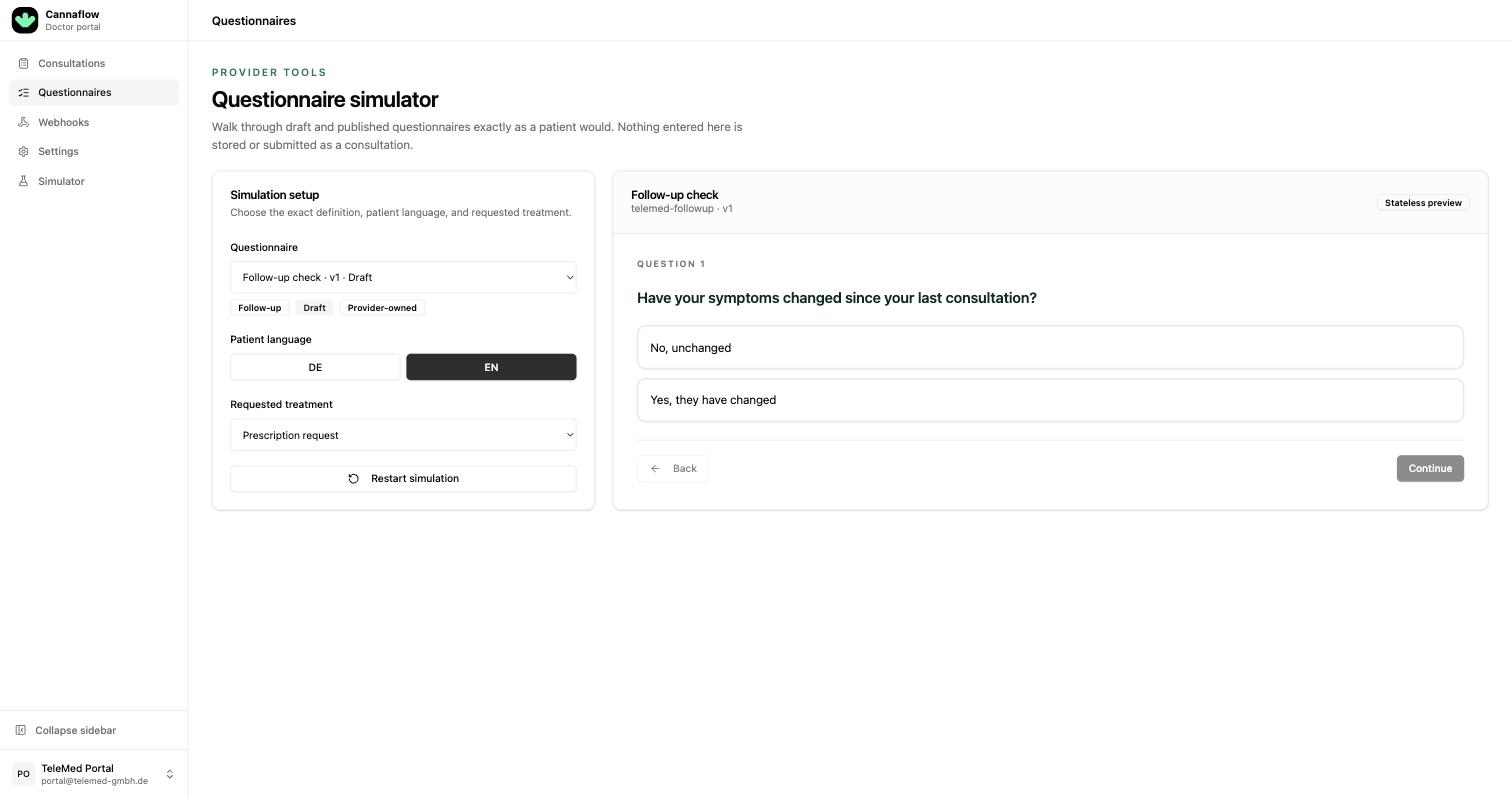
The badges under the selector show the questionnaire's role (Initial / Follow-up), its lifecycle state (Draft / Published), and whether it is Provider-owned or a Shared default. Switch the patient language between DE and EN to check both translations, and pick the requested treatment to see how the exclusion flags play out for that treatment type.
3. Iterate on branches and exclusions
Answer the questions as a patient would. When an answer carries an exclusion
flag, the simulator stops and names the treatment types the patient would be
excluded from, so you can confirm every disqualifiesFrom… flag does what you
intended:
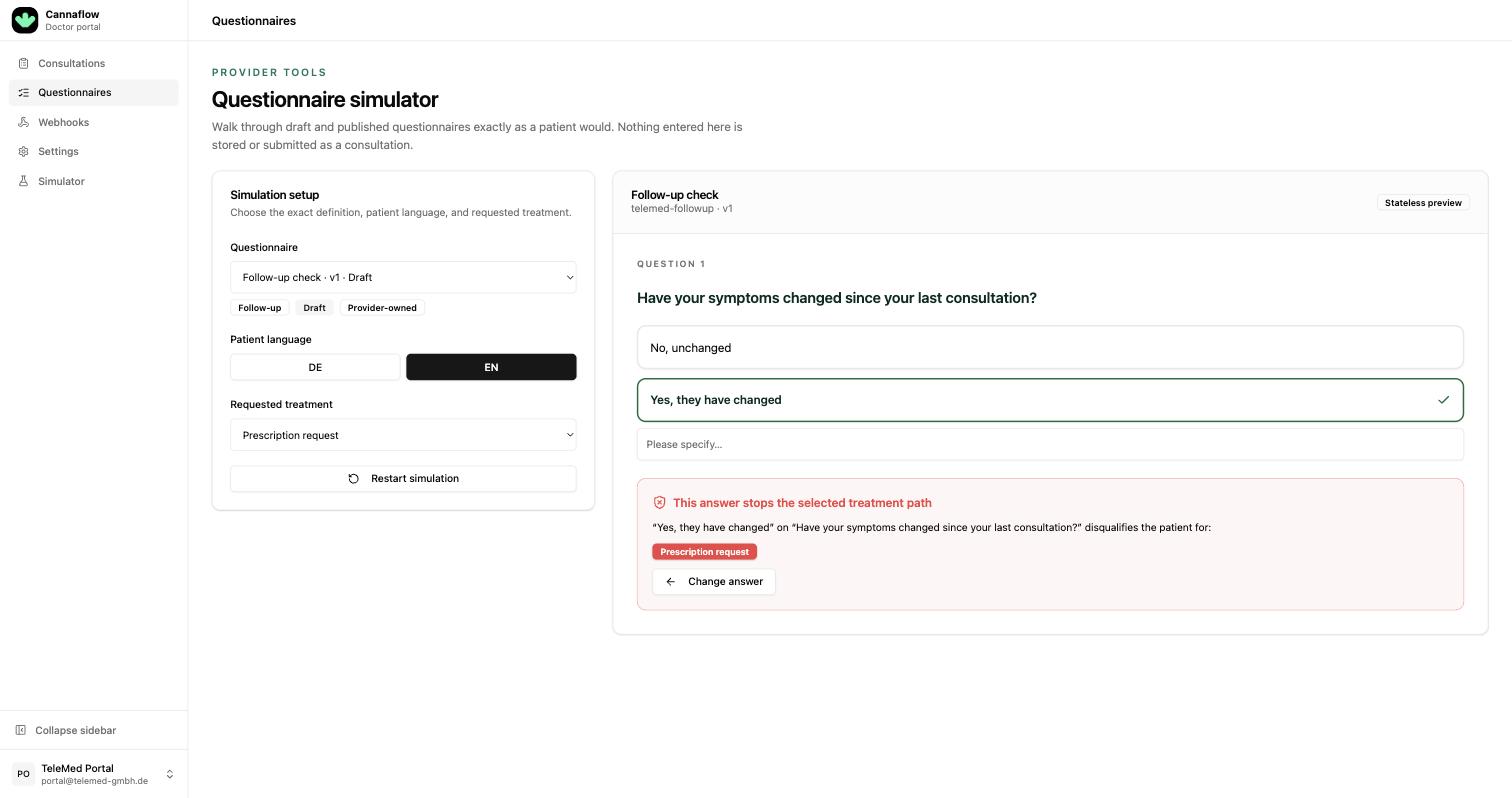
Change the definition, PUT the draft again, and select the new revision in
the simulator. Each replacement increments revision; the slug and version
stay the same until you publish.
4. Review the completed run
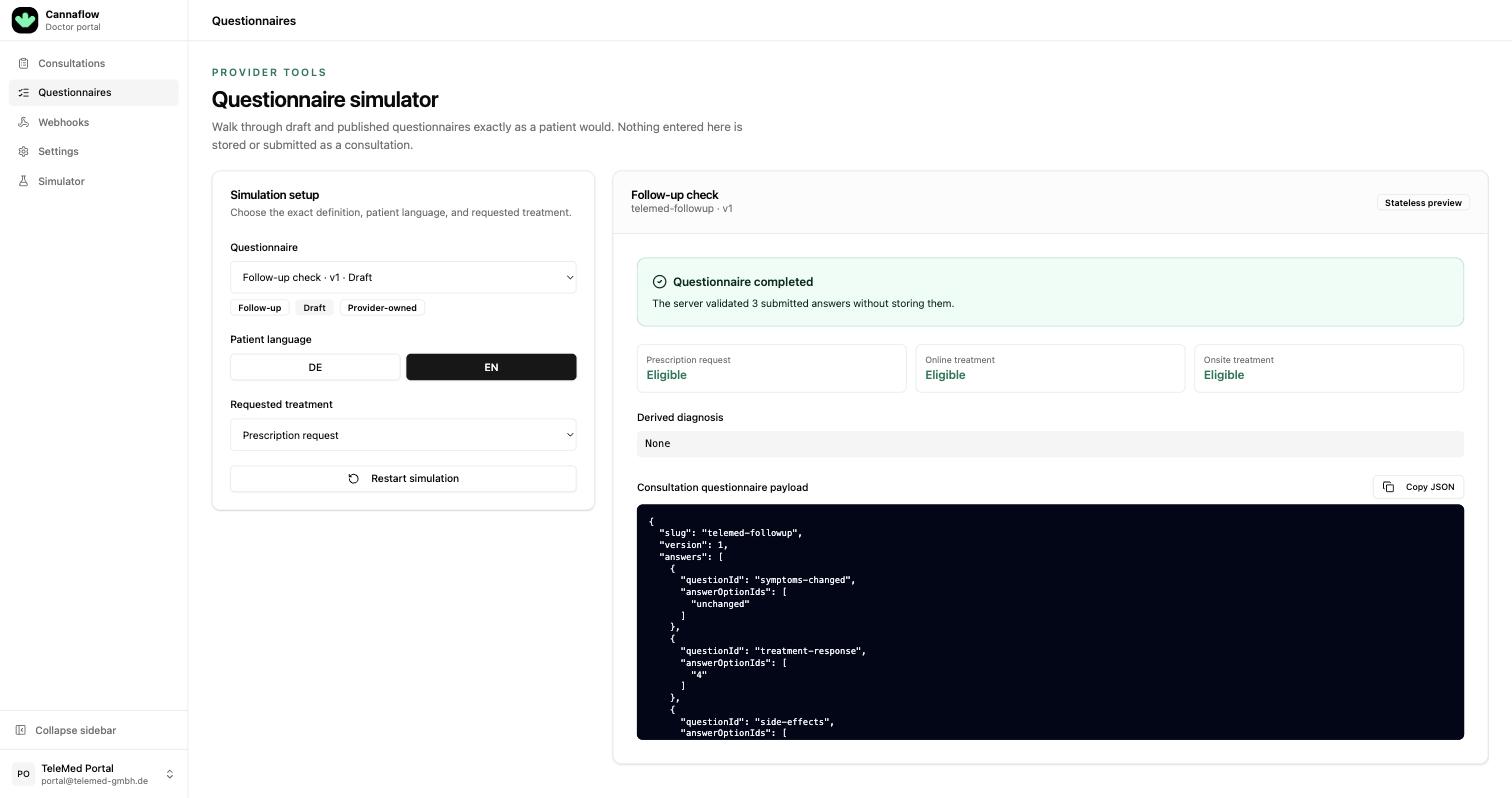
At the end of a path the server validates the answers the same way
POST /telehealth/consultations will, and the simulator shows the outcome:
eligibility per treatment type, the derived diagnosis, and the exact
questionnaire payload a consultation would carry. Copy JSON gives you a
ready-made request body for your integration tests.
5. Publish
When the draft is right, publish the revision you reviewed:
POST /api/v1/telehealth/questionnaires/telemed-followup/publish
x-api-key: <api-key>
Content-Type: application/json

{"revision": 1}
The published version is immutable and immediately available to
GET /telehealth/questionnaires/{id} and to consultations. To change it later,
upload a new draft under the same slug and publish again; the server assigns the
next version, and consultations that pinned an earlier version keep rendering
with that version.
6. What the doctor sees
Every consultation shows the doctor a Medical history panel with the patient's answers rendered in the doctor's language: the derived diagnosis, each question in the order the patient answered it, the selected option labels, and any free text or additional text the patient entered. The badge next to the patient shows whether the consultation was an initial treatment or a follow-up prescription.
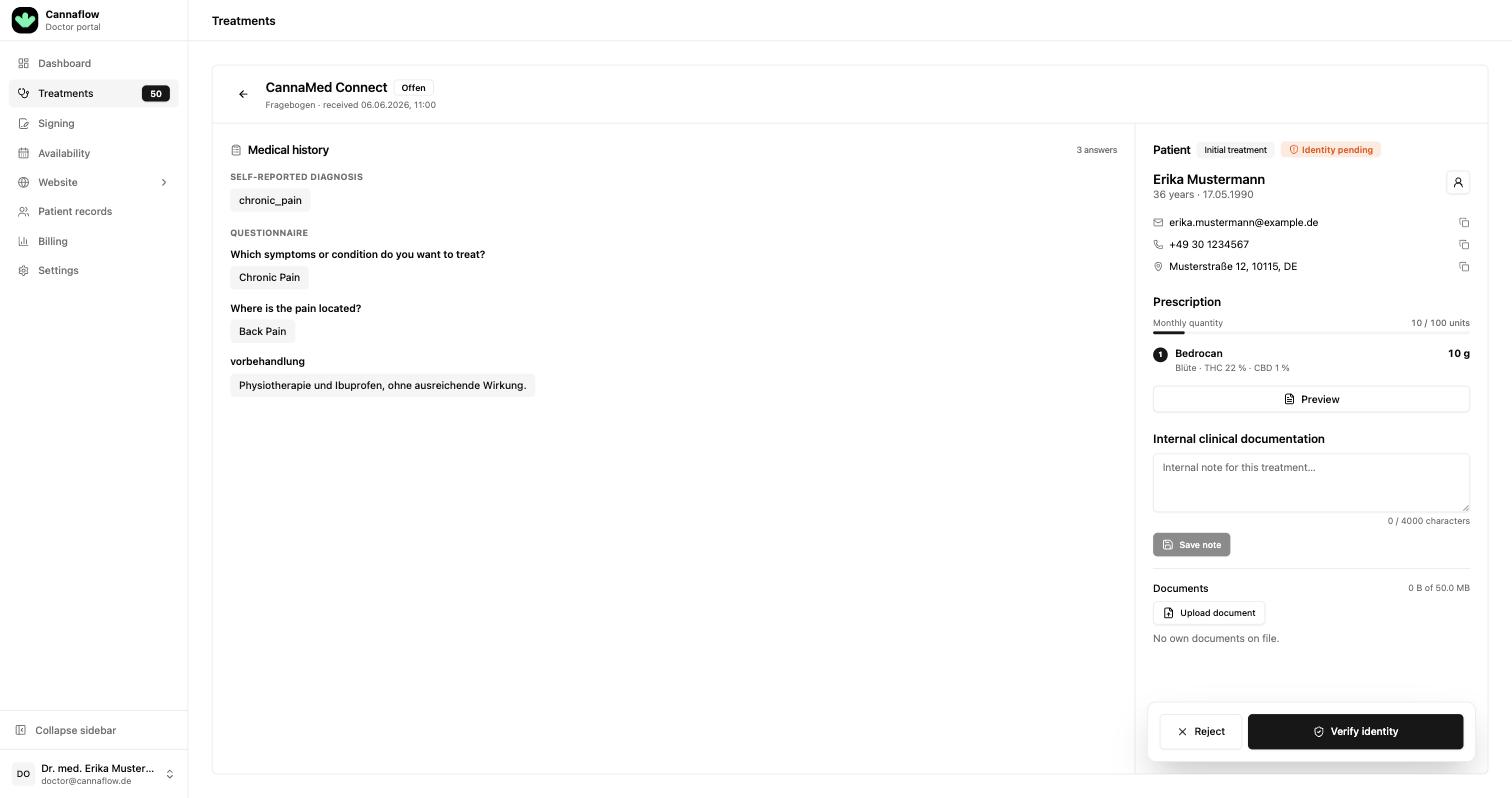
The doctor sees the questionnaire version the patient actually answered, so publishing a new version never changes how earlier consultations are displayed. Keep question and option texts self-explanatory: the doctor reads them as written, without the slugs or the branching logic behind them.
Follow-up Validation
A followUp questionnaire presupposes that Cannaflow already knows the patient.
By default, POST /telehealth/consultations therefore only accepts a follow-up
submission when the same patientReferenceId already has a completed
consultation with your organization — that is, a consultation for which a
doctor issued and signed a prescription. Pending, rejected, and cancelled
consultations do not count, and consultations with a different provider do not
count either.
When the check fails, no consultation is created and the API responds with
422 QuestionnaireNotApplicable:
{
  "id": "QuestionnaireNotApplicable",
  "message": "This patient has no completed consultation; submit the full intake.",
  "payload": {
    "questionnaireId": "telemed-followup",
    "expected": "initial",
    "reason": "patient_has_no_completed_consultation",
    "patientReferenceId": "your-patient-id"
  }
}
The correct reaction is to send the patient through an initial questionnaire
instead. initial questionnaires have no prerequisite; a patient may submit one
at any time, including after earlier consultations, when their symptoms have
changed.
This validation is configured by Cannaflow per telemedicine provider. It is enabled for every provider by default. If you already ensure on your side that a follow-up only reaches Cannaflow for patients with a completed consultation, contact Cannaflow and we can disable the check for your organization. Structural validation and treatment eligibility are not affected by this setting.
Definition Schema
Provide each questionnaire as one JSON document using the following shape in
PUT /telehealth/questionnaires/{id}/draft. The {id} path parameter is the
stable slug. This is the authoring format, not the localized wire format returned
by GET /telehealth/questionnaires/{id}. See
Get a questionnaire definition for the public
API response schema.
Questionnaire
| Field | Type | Required | Meaning |
|---|---|---|---|
role | initial or followUp | yes | Patient-history role. It cannot change after the slug is created. |
titleDe, titleEn | string or null | no | Patient-facing title. |
descriptionDe, descriptionEn | string or null | no | Patient-facing supporting content. |
firstQuestionSlug | string or null | no | Slug of the entry question. Defaults to the first item in questions. |
questions | array | yes | At least one question. Question slugs must be unique within the questionnaire. |
Question
| Field | Type | Required | Meaning |
|---|---|---|---|
slug | string | yes | Stable identifier used in answers and branch targets. |
titleDe, titleEn | string | yes | Patient-facing question text. |
descriptionDe, descriptionEn | string or structured value | no | Additional instructions or criteria. |
type | enum | yes | singleChoice, multipleChoice, scale, freeText, or checkbox. |
isRequired | boolean | no | Defaults to true. |
requiredFreeTextLength | non-negative integer or null | no | Minimum length for a non-empty freeText answer. |
nextQuestion | string or null | no | Question slug followed after a freeText question. |
answerOptions | array | no | Options for choice, scale, and checkbox questions. |
singleChoice, scale, and checkbox accept at most one selected option.
multipleChoice accepts one or more options. freeText uses nextQuestion
because it has no answer option from which to select a branch.
Answer Option
| Field | Type | Required | Meaning |
|---|---|---|---|
value | string | yes | Stable machine value submitted in answerOptionIds. Unique within its question. |
textDe, textEn | string | yes | Patient-facing option label. |
diagnosis | string or null | no | Machine-readable diagnosis derived when this option is selected. |
nextQuestion | string or null | no | Next question slug. A missing or null target ends this path. |
hasAdditionalTextInput | boolean | no | Shows an additional text field. Defaults to false. |
requiresAdditionalTextInput | boolean | no | Makes the additional text mandatory when selected. Defaults to false. |
disqualifiesFromPrescriptionRequest | boolean | no | Excludes prescription-only treatment. Defaults to false. |
disqualifiesFromOnlineTreatment | boolean | no | Excludes online treatment and prescription requests. Defaults to false. |
disqualifiesFromOnsiteTreatment | boolean | no | Excludes every treatment type. Defaults to false. |
All branch targets must name a question in the same definition. Options selected
together in a multipleChoice question must lead to the same non-null target;
otherwise the submitted path is rejected as divergent_branch.
Reference Definition
This compact initial questionnaire demonstrates diagnosis derivation, branching, required additional text, free text, and treatment exclusion. Clinical content must be reviewed and approved by the provider before onboarding.
{
  "role": "initial",
  "titleEn": "Medical intake",
  "titleDe": "Medizinische Anamnese",
  "descriptionEn": "Answer all questions truthfully.",
  "descriptionDe": "Bitte beantworte alle Fragen wahrheitsgemäß.",
  "firstQuestionSlug": "treatment-reason",
  "questions": [
    {
      "slug": "treatment-reason",
      "titleEn": "What would you like to treat?",
      "titleDe": "Was möchtest du behandeln?",
      "type": "singleChoice",
      "isRequired": true,
      "answerOptions": [
        {
          "value": "treatment-reason-chronic-pain",
          "textEn": "Chronic pain",
          "textDe": "Chronische Schmerzen",
          "diagnosis": "chronic_pain",
          "nextQuestion": "pain-details"
        },
        {
          "value": "treatment-reason-other",
          "textEn": "Another condition",
          "textDe": "Eine andere Erkrankung",
          "hasAdditionalTextInput": true,
          "requiresAdditionalTextInput": true,
          "disqualifiesFromPrescriptionRequest": true,
          "nextQuestion": "contraindications"
        }
      ]
    },
    {
      "slug": "pain-details",
      "titleEn": "Describe the location and duration of your pain.",
      "titleDe": "Beschreibe Ort und Dauer deiner Schmerzen.",
      "type": "freeText",
      "isRequired": true,
      "requiredFreeTextLength": 20,
      "nextQuestion": "contraindications"
    },
    {
      "slug": "contraindications",
      "titleEn": "Do any listed contraindications apply to you?",
      "titleDe": "Trifft eine der aufgeführten Kontraindikationen auf dich zu?",
      "descriptionEn": "For example: pregnancy, psychosis, or a cannabis allergy.",
      "descriptionDe": "Zum Beispiel: Schwangerschaft, Psychose oder Cannabisallergie.",
      "type": "singleChoice",
      "isRequired": true,
      "answerOptions": [
        {
          "value": "contraindications-none",
          "textEn": "No",
          "textDe": "Nein"
        },
        {
          "value": "contraindications-present",
          "textEn": "Yes",
          "textDe": "Ja",
          "disqualifiesFromOnsiteTreatment": true
        }
      ]
    }
  ]
}
Create or replace the single current draft, then publish it. Every draft
response carries a revision that increments on each replacement; publishing
requires the revision you reviewed, and a draft that was replaced in the
meantime is rejected with 409 InvalidState so an unreviewed definition never
goes live. Fetch GET .../draft for the current revision and review it again.
PUT /api/v1/telehealth/questionnaires/example-provider-initial/draft
x-api-key: <api-key>
Content-Type: application/json

<definition above>
POST /api/v1/telehealth/questionnaires/example-provider-initial/publish
x-api-key: <api-key>
Content-Type: application/json

{"revision": 1}
Use POST /telehealth/questionnaires/{id}/archive to retire an owned
questionnaire. Use PUT /telehealth/questionnaires/{id}/availability with
{"enabled": false} to disable a shared definition for the calling provider.
Use the questionnaire API reference for the complete public response schema. The example above is a structural reference, not a clinical template. A provider remains responsible for its own wording, medical rules, and approvals.
Excluding Patients
Exclusion is configured on the answer that makes a patient ineligible. The flags have cumulative precedence:
| Flag set on the selected answer | Prescription request | Online treatment | Onsite treatment |
|---|---|---|---|
disqualifiesFromPrescriptionRequest | excluded | allowed | allowed |
disqualifiesFromOnlineTreatment | excluded | excluded | allowed |
disqualifiesFromOnsiteTreatment | excluded | excluded | excluded |
For example, an unsupported indication may exclude only a direct prescription,
while an absolute contraindication should set
disqualifiesFromOnsiteTreatment: true to exclude all treatment types. Do not set
all three flags when the strongest applicable flag expresses the intended rule.
Structural validity and treatment eligibility are separate. A complete answer
set can have valid: true while the patient appears under ineligibleFor for one
or more treatment types.
Validate an Answer Path
After publishing the definition, fetch it and render the branch starting at
firstQuestionId. Submit option value fields, not labels or internal UUIDs.
POST /api/v1/telehealth/questionnaires/example-provider-initial/validate
x-api-key: <api-key>
Content-Type: application/json

{
    "questionnaireVersion": 1,
    "requestedTreatmentType": "prescriptionRequest",
    "answers": [
        {
            "questionId": "treatment-reason",
            "answerOptionIds": ["treatment-reason-chronic-pain"]
        },
        {
            "questionId": "pain-details",
            "answerOptionIds": [],
            "freeText": "Lower back pain for approximately three years."
        },
        {
            "questionId": "contraindications",
            "answerOptionIds": ["contraindications-none"]
        }
    ]
}
A path is ready to submit only when:
validistrue;errorsis empty; and- the intended treatment is in
eligibleFor, oreligibleistruewhenrequestedTreatmentTypewas supplied.
The dry-run endpoint reports structural problems such as unknown questions, unknown options, missing required answers, short free text, missing additional text, version mismatches, and divergent branches.
Submission Rules
The server evaluates eligibility and the derived diagnosis from every answer in the payload, so a submission must describe exactly one walk through the graph:
- One answer per question. Send each
questionIdat most once; a correction replaces the earlier answer instead of being appended (duplicate_question_answer). - Only questions on the taken path. Starting at
firstQuestionId, follow thenextQuestionIdof the selected option (or of the free-text question) and answer only the questions reached that way. Answers to questions on other branches — for example left over after the patient changed an earlier answer — are rejected (off_path_answer) rather than silently counted against the patient's eligibility. - Single-select cardinality applies to optional questions too. A
singleChoice,scale, orcheckboxquestion accepts at most one option whether or not it is required (too_many_answers).
When a required answer is missing or an option is unknown mid-path, the server reports that error and does not judge answers to questions that follow the broken one, because the intended path is unknown past that point. Fix the reported question and validate again.
Validation Is Enforced
Clients should call the validation endpoint before creating a consultation so
they can present actionable errors to the patient. This dry run is not a way to
opt out of server validation: POST /telehealth/consultations runs the same
structural and eligibility rules again.
The platform restricts the consultation when validation has not succeeded:
- structurally invalid answers are rejected and no consultation is created;
- an outdated questionnaire version is rejected and the client must fetch the current definition;
- an answer that excludes the requested treatment is rejected; and
- a follow-up questionnaire is rejected (
QuestionnaireNotApplicable, withpayload.expected=initial) unless the patient has a completed prior consultation with the provider — see Follow-up Validation for the details and the per-provider opt-out.
Never implement eligibility only in the provider's frontend. The Cannaflow server is the authoritative enforcement point.
Onboarding Checklist
Before publishing each questionnaire:
- choose a stable slug and an immutable
initialorfollowUprole; - German and English patient-facing text;
- the rationale and intended treatment scope for every disqualifying option;
- representative valid paths through every branch;
- representative excluded paths for each treatment type used by the provider;
- confirmation that the provider's clinical and legal reviewers approved the content.
Every branch and exclusion path must be tested before the questionnaire is assigned to a production offering.